DesignSafe brings together the computational power of the Texas Advanced Computing Center (TACC) with cloud-based interfaces, allowing researchers to move between interactive exploration and large-scale, production-level computation. Whether testing a small Python script in a Jupyter notebook or deploying thousands of simulations across TACC HPC systems, the platform scales from one core to tens of thousands.
DesignSafe supports the full life cycle of computational research: developing models and scripts, running and monitoring simulations, managing input and output data, and sharing or reproducing results. All of this happens through a browser. The platform handles the details of moving files to the right place, submitting jobs to the right machine, and collecting results when they finish.
This page explains how DesignSafe works and how the pieces fit together. The rest of the guide covers specific tasks: compute environments (JupyterHub, VMs, HPC systems, queues, and allocations), storage and file management (storage areas, paths, file staging), submitting jobs, debugging failures, and parameter sweeps.
The DesignSafe Portal
Everything starts at the DesignSafe web portal. The portal is the single entry point for launching compute environments, submitting jobs, and managing data. From the workspace, researchers can open a JupyterHub notebook, start an interactive application like MATLAB or QGIS, submit a batch simulation to an HPC cluster, or browse and publish datasets in the Data Depot.
Researchers can also bypass the portal and submit jobs programmatically from a Jupyter notebook using dapi. This is the preferred approach for automated pipelines, parameter sweeps, and reproducible workflows.
Three compute environments
DesignSafe provides three places where computation can happen. Each serves a different purpose.
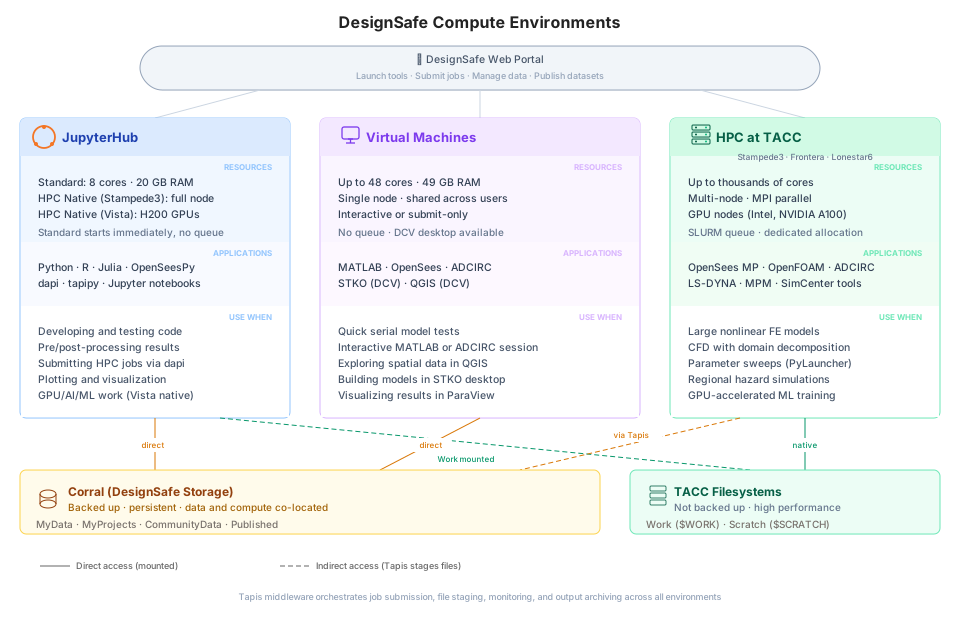
JupyterHub is where most day-to-day work happens. Each session gets a dedicated container (up to 8 CPU cores, 20 GB RAM) that starts immediately with no queue wait. Researchers write code, test models, visualize results, and submit HPC jobs from here. For heavier interactive work, Jupyter HPC Native sessions run directly on Stampede3 or Vista GPU nodes with full node resources, though these go through the SLURM queue.
Virtual machines run applications that need an interactive session without a queue wait. OpenSees Interactive, MATLAB, ADCIRC Interactive, STKO, and QGIS all run on shared VMs at TACC. STKO and QGIS provide a full graphical desktop through NICE DCV, which streams a remote desktop to the browser. VMs share hardware across users, so they work best for lightweight tasks and quick tests.
HPC systems handle production-scale computation. Stampede3, Frontera, and Lonestar6 are clusters of interconnected machines (nodes), each with dozens of CPU cores and hundreds of gigabytes of memory. Jobs can span multiple nodes using MPI (Message Passing Interface), a standard that lets parallel processes on different nodes exchange data during execution. SLURM manages the queue. Long-running simulations, multi-core parallel analyses, and parametric sweeps with hundreds of runs all belong on HPC. Even when launched through the portal’s graphical forms, HPC jobs are batch jobs that run unattended.
Which environment for what
| What you need to do | Environment | Example |
|---|---|---|
| Write and test code, visualize results | JupyterHub | Developing a post-processing script, plotting response spectra |
| Interactive GUI session | VM (DCV desktop) | Building a mesh in STKO, exploring spatial data in QGIS |
| Quick serial test | VM | Testing an OpenSees Tcl model, short MATLAB analysis |
| Large or long-running simulation | HPC batch | Nonlinear time-history analysis, ADCIRC storm-surge forecast |
| Hundreds of independent runs | HPC with PyLauncher | Fragility study across 500 ground-motion records |
| Parallel simulation across many cores | HPC with MPI | Multi-node OpenFOAM CFD, ADCIRC with millions of elements |
| GPU-accelerated work | Jupyter HPC Native (Vista) or GPU queue | ML training, GPU-accelerated simulation |
Most researchers follow a natural progression: develop and test interactively in JupyterHub, then submit production runs as batch jobs to HPC. Compute Environments covers each environment in detail, including node types, queues, and allocations.
Data and compute live together
Research data and compute hardware are co-located at TACC. A ground-motion database in CommunityData can be referenced directly from a simulation job without downloading it to a laptop and re-uploading it to the cluster. This is one of DesignSafe’s most important advantages.
DesignSafe provides several storage areas with different tradeoffs between persistence and performance.
| Storage area | Purpose | Backed up |
|---|---|---|
| MyData | Private files (scripts, inputs, outputs) | Yes |
| MyProjects | Shared project files visible to collaborators | Yes |
| Work | Active workspace on the HPC system | No |
| Scratch | Temporary high-speed storage on HPC | No (purged) |
| CommunityData | Public datasets shared across DesignSafe | Yes |
| NHERI-Published | Archived NHERI datasets with DOIs | Yes |
| NEES | Legacy NEES datasets | Yes |
MyData and MyProjects live on Corral, TACC’s backed-up storage. Work and Scratch are fast but not backed up. Always copy important results to MyData or MyProjects when a job finishes.
When a job is submitted, Tapis automatically stages input files to the execution system before the job starts, and archives output back to DesignSafe storage after completion. There is no manual file transfer step. Storage and File Management covers paths across environments, dapi file operations, and transfer strategies in detail.
Designing your workflow
A computational workflow is the sequence of steps that takes a research question from raw inputs to published results. It includes preparing input files, running simulations, analyzing the output, and often repeating the process with different parameters. On a laptop, these steps might all happen in a single folder. On DesignSafe, they may span multiple environments, but the platform is designed so the pieces connect.
A typical workflow has four stages.
| Stage | What happens | Where on DesignSafe |
|---|---|---|
| Input generation | Prepare models, parameters, ground motions, or meshes | JupyterHub (Python scripts, notebooks) or STKO (GUI mesh builder) |
| Execution | Run the simulation, ensemble, or training loop | HPC batch job (single run or PyLauncher sweep), or VM for quick tests |
| Post-processing | Extract results, compute statistics, generate figures | JupyterHub (pandas, matplotlib, custom scripts) |
| Iteration | Repeat with new parameters, Monte Carlo samples, or refined models | dapi from JupyterHub (programmatic resubmission) |
When these stages are separate, each can be reused across projects or swapped to a different environment. A mesh generator can change without touching the solver. The execution stage can move from JupyterHub to HPC without rewriting the post-processing code. The Data Depot ties the stages together by providing shared storage that is accessible from every environment.
Design workflows around the research question, not around a specific tool. A workflow that runs one model today should be able to scale to hundreds of runs tomorrow. Different workloads scale differently, and the right strategy depends on the problem. Most HPC workloads on DesignSafe fall into one of two patterns:
Embarrassingly parallel (parametric sweeps). Many independent runs that do not communicate with each other. Each run gets its own inputs, produces its own outputs, and can succeed or fail without affecting the others. A fragility study running the same OpenSeesPy model across 500 ground-motion records is a classic example. Use PyLauncher to dispatch all tasks inside a single SLURM allocation. See Parameter Sweeps.
Tightly coupled parallel (MPI). One large model split across many cores that must communicate during execution. Each core (rank) works on a different part of the problem and exchanges data with its neighbors through MPI. A multi-node OpenFOAM simulation, ADCIRC storm surge model, or OpenSees MP domain-decomposed analysis all fall here. See Running HPC Jobs for MPI details.
These are not the only patterns — some workloads are memory-bound, GPU-accelerated, or combine both approaches — but the distinction between “many independent runs” and “one big coupled run” drives most decisions about nodes, cores, and which application to use.
| Workload pattern | How it scales | Example |
|---|---|---|
| Many independent runs | Add more tasks to a single allocation (PyLauncher) | Fragility study with 500 ground-motion records |
| One large model | Divide the domain across cores with MPI | 3D nonlinear structural analysis, ADCIRC storm surge |
| Memory-bound analysis | Use nodes with more RAM or fewer cores per node | Large stiffness matrix assembly |
| GPU-accelerated work | Use GPU queues on Stampede3 or Lonestar6 | ML training, dense linear algebra |
Where to go next
| I want to... | Read |
|---|---|
| Understand JupyterHub, HPC systems, queues, and allocations | Compute Environments |
| Understand storage areas, paths, and file staging | Storage and File Management |
| Submit a job through the portal | Portal Submission |
| Submit a job with dapi (serial or parallel) | Running HPC Jobs |
| Figure out why my job failed | Debugging Failed Jobs |
| Run hundreds of independent simulations | Parameter Sweeps |
| See what applications are available | DesignSafe Applications |
| Understand Tapis internals or build a custom app | Advanced Topics |