This page walks through creating a custom HPC application on DesignSafe. For background on what Tapis Apps are and how they work, see Tapis and Custom Apps.
Custom Tapis Apps
On DesignSafe, you have two productive ways to run work on HPC systems.
Use a public Tapis App. These are pre-configured, maintained templates for common tools (e.g., OpenSees, OpenFOAM). Fastest path to results, minimal setup.
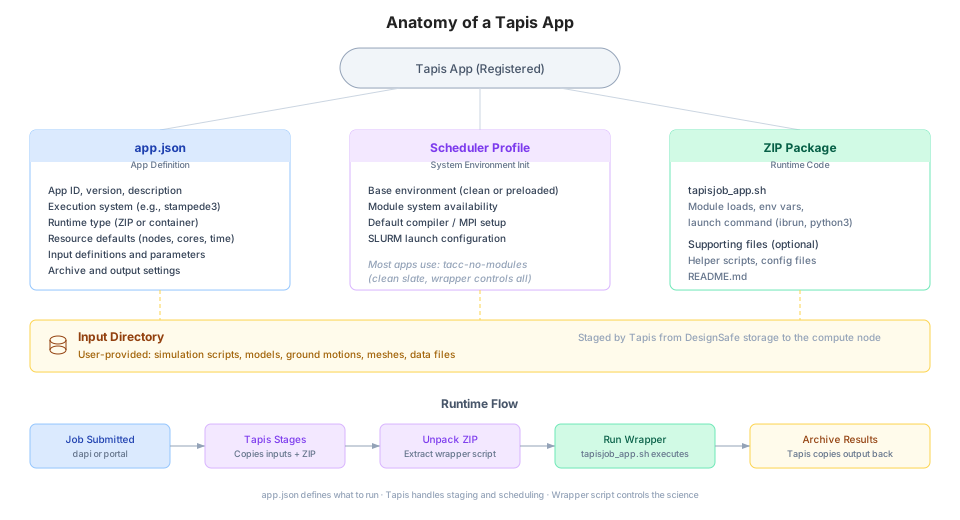
Author your own Tapis App. A custom template you control (wrapper + app.json, plus optional profile.json) when you need different binaries, launch logic, inputs/parameters, or project-specific defaults.
Start with a public app if your workflow fits its interface. Write a custom app when you need non-standard flags, containers/modules, pre/post steps, or a lab-specific interface you’ll reuse.
A. Use an Existing (Public) App
Public apps on DesignSafe are vetted templates for common tools. They’re the fastest path to results.
Where to find them
Web Portal, under Tools & Applications, to browse/search and read the app’s help page.
In notebooks/CLI, grab the app’s appId (and optional version) from the portal and submit jobs programmatically.
How to run effectively
Review the app’s inputs and parameters (from its schema).
Start with a small test case. Keep default resources, tune later.
Prefer stable/latest versions shown in the catalog.
Keep inputs on a Tapis-visible system (e.g., MyData, Work).
When public apps are ideal
Your workflow matches the app interface.
You want a supported, reproducible environment with minimal setup.
You don’t need custom launch logic or unusual dependencies.
B. Write Your Own App
Create a Tapis App when you need custom behavior, different software versions, or a specialized interface for your project.
Building blocks
Wrapper (e.g., tapisjob_app.sh). Non-interactive, writes outputs to $PWD, handles launch (ibrun/mpirun/srun) and logging.
app.json (required). App ID/version, execution system/type (HPC), job type (MPI/SERIAL), defaults (nodes/ppn/walltime), inputs and parameters.
profile.json (optional). Modules and env vars (or use containers).
Tiny test dataset for validation.
Registration and sharing
Register via portal or API, then share with your project/team.
For catalog visibility, follow DesignSafe’s review/publication process.
Best practices
Version every change (e.g., 1.2.0). Keep a changelog. Avoid breaking users.
Use Tapis URIs and parameters. No hard-coded paths.
Set sensible defaults (resources, inputs) and document them.
Keep profiles minimal. Prefer containers or a short modules list.
Provide clear labels/descriptions so users don’t guess.
When custom apps shine
New binaries/flags, custom pre/post steps, lab-specific UI.
Automated parameter sweeps, ensembles, multi-stage workflows.
A reproducible template your group can reuse.
Quick Chooser
| Need | Public app | Your app |
|---|---|---|
| Fast start with a standard tool | Yes | |
| Custom binaries, flags, or launch logic | Yes | |
| Team-specific interface & defaults | Yes | |
| Minimal maintenance | Yes | |
| Full control / special dependencies | Yes |
Creating a Custom Tapis App
This is a comprehensive, unified guide. It walks you through creating a custom HPC-enabled Tapis app on DesignSafe that uses TACC’s environment modules (not Docker), and is launchable through both code (Python + Tapipy) and the DesignSafe GUI.
This guide ties together
Tapis-based app registration and job management
Module-based (non-container) execution on TACC resources
DesignSafe-specific deployment and GUI launching
This guide helps you define a reusable, shareable app that
Uses modules (like module load python, OpenSees, etc.)
Can be launched from either the DesignSafe GUI or Tapipy in Python
Prerequisites
Basic knowledge of Python and shell scripting
Access to a TACC execution system (e.g., stampede3)
Installed tools (Python environment with tapipy, optionally tapis-cli-ng for terminal-based registration)
Step 1. Set Up Your App Directory
Structure your folder like this.
my-awesome-app/
├── run_analysis.py       # Your Python script
├── wrapper.sh            # Wrapper to load modules and run the script
├── app-definition.json   # Tapis app definition (for GUI + CLI)
Step 2. Your Python Code (run_analysis.py)
Example script.
import sys

if len(sys.argv) != 2:
    print("Usage: python run_analysis.py <input_file>")
    sys.exit(1)

with open(sys.argv[1], 'r') as f:
    content = f.read()

print("=== File Contents ===")
print(content)
Step 3. Wrapper Script (wrapper.sh)
This script is executed on the HPC system.
#!/bin/bash
cd $WORK/$JOB_NAME

# Load the necessary environment modules
module load python/3.9

# Run your Python script using an input file provided by the user
python run_analysis.py "$input_file"
Make it executable.
chmod +x wrapper.shStep 4. Tapis App Definition (app-definition.json)
{
  "id": "my-awesome-app-1.0",
  "name": "My Awesome App",
  "version": "1.0",
  "executionSystem": "designsafe.community.execution",
  "deploymentPath": "apps/my-awesome-app/1.0",
  "templatePath": "wrapper.sh",
  "executionType": "HPC",
  "runtime": "LINUX",
  "jobType": "BATCH",
  "parallelism": "SERIAL",
  "maxJobs": 10,
  "defaultMemory": "2GB",
  "defaultProcessors": 1,
  "defaultNodes": 1,
  "defaultMaxRunTime": "00:30:00",
  "deploymentSystem": "designsafe.storage.default",
  "inputs": [
    {
      "id": "input_file",
      "details": {
        "label": "Input File",
        "description": "A file to process"
      },
      "required": true,
      "inputType": "URI"
    }
  ],
  "parameters": [],
  "outputs": [
    {
      "id": "stdout.txt",
      "value": {
        "default": "stdout.txt"
      }
    }
  ],
  "tags": ["custom", "python", "designsafe"]
}
Step 5. Upload to DesignSafe/TACC
Upload your app files.
scp -r my-awesome-app/ yourusername@login.designsafe-ci.org:/work/apps/my-awesome-app/1.0Or via the DesignSafe Data Depot, move the files to
/work/apps/my-awesome-app/1.0Step 6. Register the App via Tapis CLI (Optional)
If you prefer CLI.
pip install tapis-cli-ng
tapis auth login
tapis apps create -F app-definition.json
tapis apps list | grep my-awesome-app
Step 7. Register and Use the App in Python with Tapipy
Authenticate and upload your files (same as above).
from tapipy.tapis import Tapis
import json

client = Tapis(
    base_url="https://designsafe.dev.tapis.io",  # or production URL
    username="your-username",
    password="your-password",
    tenant_id="designsafe"
)
client.get_tokens()

# Register the app
with open("app-definition.json") as f:
    app_def = json.load(f)

client.apps.createAppVersion(body=app_def)
Step 8. Upload an Input File
with open("example_input.txt", "rb") as f:
    client.files.insert(
        systemId="designsafe.storage.default",
        path="input/example_input.txt",
        file=f
    )
Step 9. Submit a Job from Python
job = client.jobs.submitJob(body={
    "name": "my-first-designsafe-job",
    "appId": "my-awesome-app-1.0",
    "appVersion": "1.0",
    "inputs": {
        "input_file": "tapis://designsafe.storage.default/input/example_input.txt"
    },
    "archive": True,
    "archiveSystemId": "designsafe.storage.default",
    "archivePath": "archive/my-awesome-output"
})
print("Job submitted:", job.id)
Step 10. Monitor and Download Output
import time

while True:
    status = client.jobs.getJob(jobId=job.id).status
    print("Status:", status)
    if status in ["FINISHED", "FAILED", "CANCELLED"]:
        break
    time.sleep(10)

# Download output
client.jobs.getJobOutput(jobId=job.id, path="stdout.txt", destination="./stdout.txt")
Step 11. Launch from DesignSafe GUI
Once registered
Go to Workspace, then Tools & Applications, then Private Apps
Click your app (“My Awesome App”)
Fill in input fields (like file selectors)
Launch job. Tapis runs it on Stampede3 or Frontera
Results appear in your Project Data folder
Tips and Best Practices
Use parallelism: PARALLEL for MPI or multithreaded jobs
Use WORK for persistent storage
Load any required tools (MATLAB, R, Python, etc.) with module load inside wrapper.sh
Add “helpURI” to your app JSON for linking to documentation